Ledger Flex vs Trezor Safe 5: Which Hardware Wallet Is Worth Your Money in 2026?
Affiliate Disclosure: This article may contain affiliate links. We may earn a commission at no extra cost to you. All opinions are our own.
Marcus Chen
Senior Crypto Analyst & Educator
Certified Blockchain Professional | Former Wall Street Analyst
Marcus Chen is a cryptocurrency analyst and educator with over 8 years of experience in digital asset trading. He has helped thousands of beginners navigate the crypto markets through practical, actionable education.
Disclaimer: This content is for informational purposes only and should not be considered financial advice. Cryptocurrency investments carry significant risk. Always do your own research (DYOR) before making any investment decisions.
This article contains affiliate links. We may earn a commission at no extra cost to you if you make a purchase through these links. See our affiliate disclosure for details.
Ledger Flex vs Trezor Safe 5: Which Hardware Wallet Is Worth Your Money in 2026?
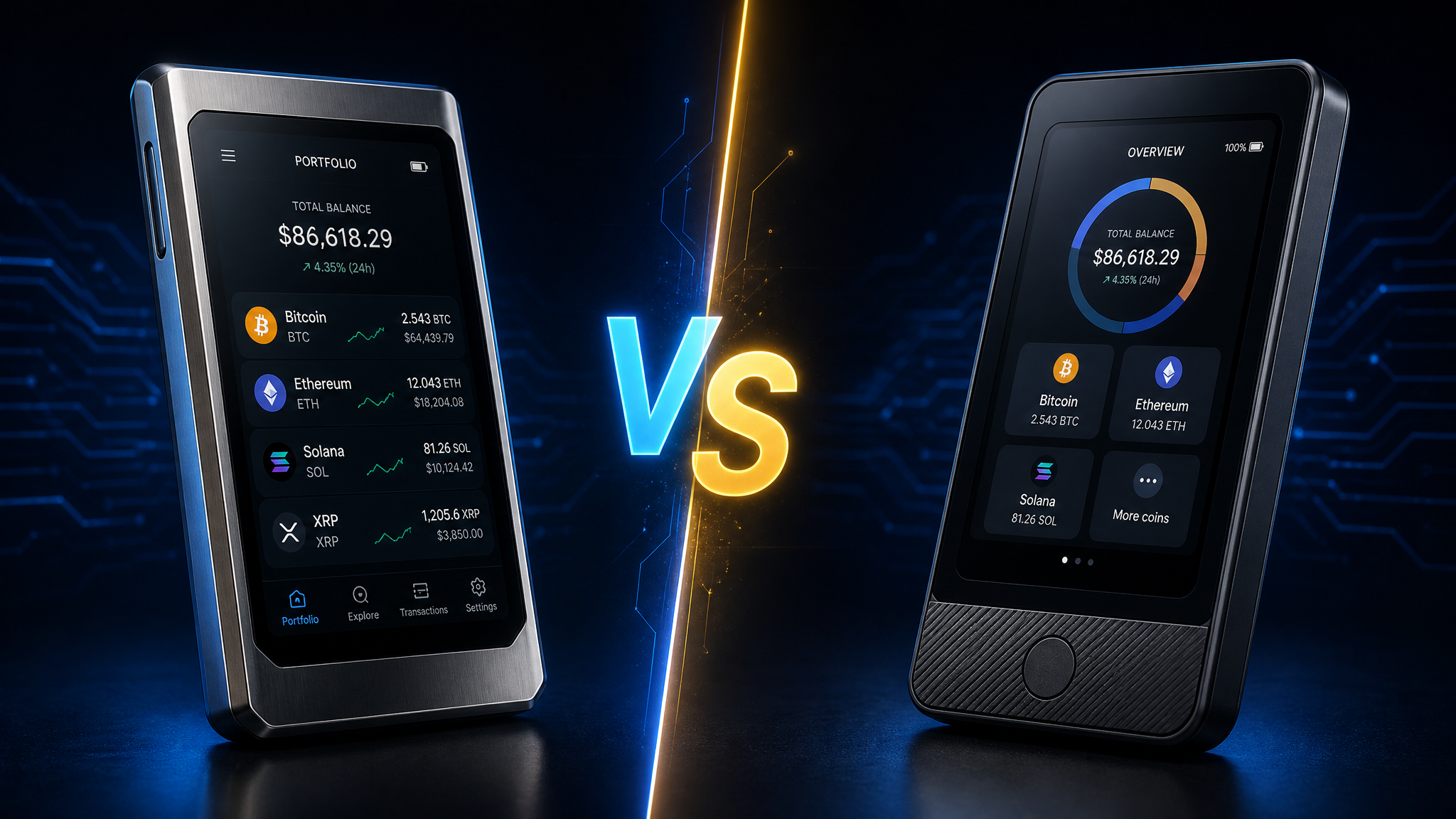
The Ledger Flex vs Trezor Safe 5 debate has become the defining hardware wallet question of 2026. Both devices represent the premium tier of cold storage — touchscreen interfaces, EAL6+ certified secure chips, and support for thousands of assets. But they take fundamentally different approaches to security, and that difference matters more than most buyers realize before they hand over their money.
I've spent time with both devices. Here's the honest breakdown.
Why Hardware Wallets Still Matter in 2026
Exchange hacks, phishing attacks, and SIM-swap scams haven't gone away. If anything, as crypto portfolios have grown in value, the attacks have gotten more sophisticated. A hardware wallet keeps your private keys offline — completely isolated from any internet-connected device — which means even if your computer is compromised, your funds stay safe.
The question isn't whether you need a hardware wallet. If you're holding more than a few hundred dollars in crypto, you do. The question is which one fits your specific situation.
Ledger Flex: What You Get for $249
The Ledger Flex is Ledger's mid-tier premium device, sitting between the Nano X and the flagship Stax. At $249, it's a significant investment — but the hardware justifies the price for the right user.
The standout feature is the 2.84-inch E Ink touchscreen. Unlike a standard LCD, E Ink only draws power when the display changes, which means the screen can show your wallet address or transaction details without draining the battery. More importantly, Ledger's architecture means the same EAL6+ certified Secure Element chip that stores your private keys also controls what appears on that screen. This "trusted display" design is Ledger's answer to blind-signing attacks — you see exactly what the chip is signing.
Connectivity is where the Flex really shines for mobile users: Bluetooth, NFC, and USB-C. You can manage your portfolio from your phone without plugging anything in. Ledger Live, the companion app, supports native staking, DeFi access, and NFT management across desktop and mobile.
The catch? Ledger's firmware is closed-source. You're trusting Ledger's internal security team (the Ledger Donjon) and third-party certifications rather than public code audits. For most users, that's fine. For security maximalists, it's a dealbreaker.
Protect your crypto assets with a Ledger hardware wallet — the gold standard in cold storage security.
Trezor Safe 5: What You Get for $129
The Trezor Safe 5 costs exactly half the Ledger Flex. That price difference is real, and it reflects genuine hardware trade-offs — but also a completely different philosophy about what security means.
Trezor's entire brand is built on open-source transparency. Every line of firmware code is publicly available on GitHub. Security researchers, developers, and privacy advocates can audit it. That's not marketing — it's a structural commitment that has earned Trezor a loyal following among technically sophisticated users.
The Safe 5 uses a 1.54-inch color LCD touchscreen. Smaller than the Flex, but perfectly functional for reviewing transaction details. The dual-chip architecture separates key storage (handled by the EAL6+ Secure Element) from the display and user interface (handled by a general-purpose microcontroller). Ledger argues this creates a potential vulnerability; Trezor argues the open-source code eliminates hidden risks that closed firmware can't.
Backup options are where Trezor genuinely outperforms: the Safe 5 supports Shamir Backup (SLIP-39), which lets you split your recovery phrase into multiple shares. You can set it up so any 2-of-3 shares reconstruct your wallet — meaning you can store shares in different locations without any single location being a single point of failure. Ledger doesn't offer this.
The downside: USB-C only. No Bluetooth, no NFC. If you want wireless management, you'll need to use third-party wallet apps rather than Trezor Suite's desktop-first interface.
Looking for reliable crypto storage? Trezor wallets have been trusted by millions since 2014.
Security Architecture: Closed vs Open Source
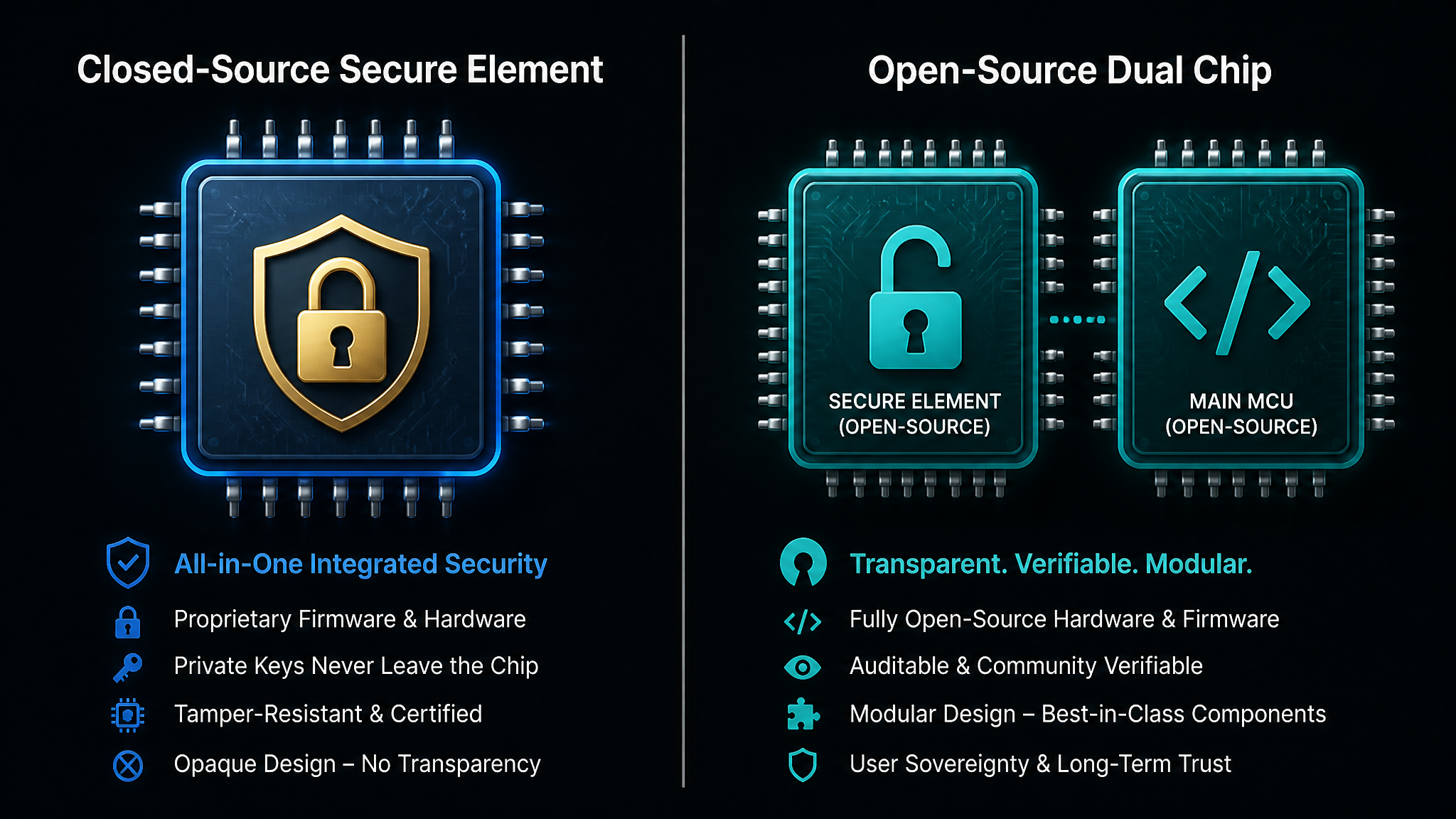
This is the core philosophical divide, and it's worth understanding before you buy.
Ledger's approach: A single EAL6+ certified Secure Element handles everything — key storage, transaction signing, and display rendering. Because the chip that signs your transaction also controls what you see on screen, Ledger argues you can trust what's displayed. The firmware is closed-source, but the chip itself is certified by independent labs.
Trezor's approach: Open-source firmware means anyone can verify there are no backdoors or hidden vulnerabilities. The dual-chip design separates concerns: the Secure Element protects keys, while the MCU handles the interface. Critics note the display isn't governed by the Secure Element — but Trezor counters that open code is more trustworthy than any certification.
Neither approach is objectively superior. Ledger's model is better if you trust hardware certifications and want a unified security environment. Trezor's model is better if you believe transparency and community auditing catch more vulnerabilities than closed-source development.
One practical note: both devices have strong track records. Neither has been successfully hacked remotely. Physical extraction attacks exist in theory for both, but require sophisticated lab equipment and physical access to your device.
Display, Connectivity, and Daily Usability
Day-to-day, the Ledger Flex is the more convenient device. Bluetooth and NFC mean you can check balances, approve transactions, and manage DeFi positions from your phone without digging out a cable. The E Ink screen is crisp and readable in any lighting condition. Ledger Live's mobile app is polished and actively maintained.
The Trezor Safe 5 requires a USB-C cable for everything. That's not a dealbreaker — most people manage their hardware wallet from a desktop anyway — but it's a real friction point if you're used to mobile-first workflows. Trezor Suite is excellent software, but it's primarily desktop-focused. Third-party integrations (MetaMask, Electrum, Sparrow) work well, but require more setup than Ledger Live's integrated experience.
If you're the type who checks your portfolio daily and wants seamless mobile access, the Flex wins on usability. If you're a set-it-and-forget-it cold storage user who only connects the device for major transactions, the Safe 5's USB-only limitation barely matters.
Backup and Recovery Options
Both devices use standard BIP-39 recovery phrases (24 words). Write them down, store them somewhere safe, and you can recover your wallet on any compatible device.
Trezor's Shamir Backup is a genuine differentiator. Instead of one 24-word phrase that's a single point of failure, you generate multiple shares. A 2-of-3 setup means you need any two of three shares to recover — you can store one at home, one at a trusted family member's location, and one in a safety deposit box. Losing one share doesn't compromise your funds.
Ledger offers "Ledger Recover" — an optional, paid service that backs up your seed phrase via ID verification to three custodians. It's controversial among privacy advocates (it requires sharing your identity and seed phrase fragments with third parties), but it's genuinely useful for users who are more worried about losing their seed phrase than about privacy.
For most users, standard BIP-39 backup is sufficient. For users with larger holdings who want redundancy without trusting a third party, Trezor's Shamir Backup is a meaningful advantage.
Supported Assets and Ecosystem
Both devices support thousands of cryptocurrencies. Ledger claims support for over 15,000 assets via Ledger Live and third-party apps. Trezor supports a similarly broad range through Trezor Suite and integrations.
For mainstream assets — Bitcoin, Ethereum, Solana, major ERC-20 tokens — both work identically well. The differences emerge at the edges: some newer DeFi protocols and NFT platforms have better native integration with Ledger Live. Trezor's ecosystem relies more heavily on third-party wallet connections, which can require more technical setup but also offers more flexibility.
Bitcoin-only users often prefer Trezor for its open-source ethos and strong Bitcoin-specific tooling (Sparrow Wallet integration is excellent). Multi-chain DeFi users often prefer Ledger for the integrated Ledger Live experience.
Price and Value: Which Offers More?
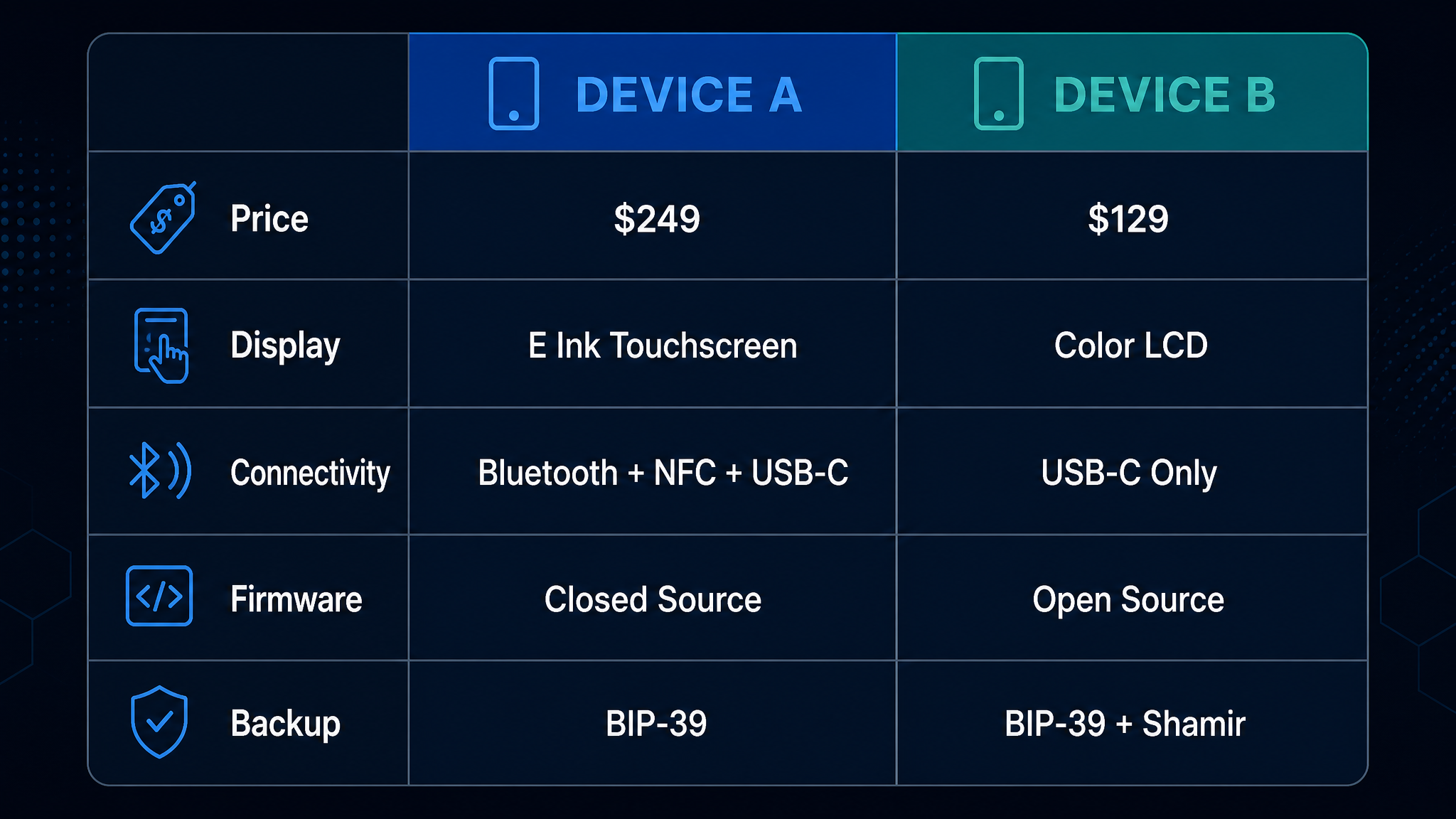
The $120 price gap is significant. Here's what you're paying for with each:
Ledger Flex at $249: Larger E Ink touchscreen, Bluetooth + NFC wireless connectivity, integrated Ledger Live ecosystem, closed-source Secure Element architecture, optional Ledger Recover service.
Trezor Safe 5 at $129: Smaller color LCD touchscreen, USB-C only, open-source firmware, Shamir Backup support, desktop-first Trezor Suite, no wireless connectivity.
If wireless connectivity and mobile-first usability are important to you, the Flex's premium is justified. If you're primarily a desktop user who values open-source transparency and advanced backup options, the Safe 5 delivers more security features per dollar.
Who Should Buy the Ledger Flex?
- Mobile-first users who want Bluetooth/NFC convenience
- DeFi and NFT users who benefit from Ledger Live's integrated ecosystem
- Users who prefer hardware-certified security over open-source auditing
- Anyone who wants the optional Ledger Recover assisted backup service
- Multi-chain users managing assets across many networks
Who Should Buy the Trezor Safe 5?
- Security maximalists who want fully auditable, open-source firmware
- Bitcoin-focused users who value Trezor's Bitcoin-native tooling
- Users who want Shamir Backup for distributed, redundant key storage
- Desktop-first users who don't need wireless connectivity
- Budget-conscious buyers who want premium security without the premium price
Final Verdict
There's no wrong answer here — both the Ledger Flex and Trezor Safe 5 are excellent hardware wallets that will keep your crypto safe. The choice comes down to your priorities.
Pick the Ledger Flex if you want the most seamless, mobile-friendly experience and don't mind paying for it. The wireless connectivity and Ledger Live integration genuinely make daily use easier, and the trusted display architecture is a real security advantage for DeFi users who sign complex transactions.
Pick the Trezor Safe 5 if you value open-source transparency, want Shamir Backup for advanced key management, and don't need wireless connectivity. At $129, it's one of the best security-per-dollar values in hardware wallets.
Either way, you're making a smart decision. The worst hardware wallet is the one you don't buy while your crypto sits on an exchange.
Key Takeaways
- Ledger Flex ($249): Best for mobile users, DeFi/NFT activity, and those who want wireless convenience
- Trezor Safe 5 ($129): Best for security maximalists, Bitcoin users, and those who want open-source firmware + Shamir Backup
- Both use EAL6+ certified Secure Elements and support thousands of assets
- The core trade-off: Ledger's closed-source trusted display vs Trezor's open-source transparency
- For most users, either device is a massive security upgrade over leaving crypto on an exchange
Tools are only as good as the trader using them.
The best platform in the world won't help if your analysis is off. Before investing in more tools, consider investing in your trading education — it's the one thing that compounds everything else.
The program I recommend to people who ask me is this crypto trading course — it\'s the one I point friends and family to when they\'re serious about learning. Daily lessons, live analysis, and a community that actually helps.
Affiliate link — I may earn a commission at no extra cost to you. I only recommend what I genuinely use.
Disclaimer: The information provided on this website is for educational and informational purposes only. It should not be considered financial or investment advice. Cryptocurrency investments carry significant risk. Always do your own research and consult with a qualified financial advisor before making investment decisions.
Free Crypto Insights
Get weekly trading tips, market analysis, and exclusive strategies delivered to your inbox.