Rabby Wallet Review 2026: The DeFi Security Upgrade MetaMask Never Gave You
Affiliate Disclosure: This article may contain affiliate links. We may earn a commission at no extra cost to you. All opinions are our own.
Marcus Chen
Senior Crypto Analyst & Educator
Certified Blockchain Professional | Former Wall Street Analyst
Marcus Chen is a cryptocurrency analyst and educator with over 8 years of experience in digital asset trading. He has helped thousands of beginners navigate the crypto markets through practical, actionable education.
 +
+
+
+
+
+
+
+
+
+
+
+
Rabby Wallet Review 2026: The DeFi Security Upgrade MetaMask Never Gave You
+ +If you've spent any real time in DeFi, you know the anxiety of clicking "Confirm" on a transaction you're not 100% sure about. That gut-check moment — is this contract safe? Am I approving unlimited access to my tokens? — is exactly the problem Rabby Wallet was built to solve. This Rabby Wallet review covers everything you need to know: its standout security features, how it compares to MetaMask, the real fee structure, and whether it's worth switching in 2026.
+ +What Is Rabby Wallet? (And Why DeFi Users Are Switching)
+ +Rabby Wallet is a non-custodial, open-source EVM wallet developed by the team behind DeBank — the popular DeFi portfolio tracker backed by Sequoia Capital and Coinbase Ventures with $25 million in funding. DeBank was co-founded in 2019 by Xu Yong and CEO Tang Hongbo, and the Rabby Wallet grew directly out of their deep understanding of how DeFi users actually interact with protocols.
+ +The pitch is simple: MetaMask is the industry standard, but it was built for a simpler era. Rabby was designed from scratch for the multi-chain, high-stakes DeFi environment of today. It supports over 140 EVM-compatible chains — Ethereum, Arbitrum, Optimism, Polygon, BNB Chain, Avalanche, Base, and dozens more — and it does something MetaMask still doesn't: it tells you exactly what a transaction will do before you sign it.
+ +Available as a browser extension (Chrome, Brave, Edge), desktop app (Windows, macOS), and mobile app (iOS and Android), Rabby has quietly built a loyal following among DeFi power users who got tired of flying blind.
+ + +
+
+
+
Rabby Wallet's Standout Security Features
+ +Security is where Rabby genuinely earns its reputation. These aren't marketing bullet points — they're features that change how you interact with DeFi.
+ +Pre-Transaction Simulation: See Before You Sign
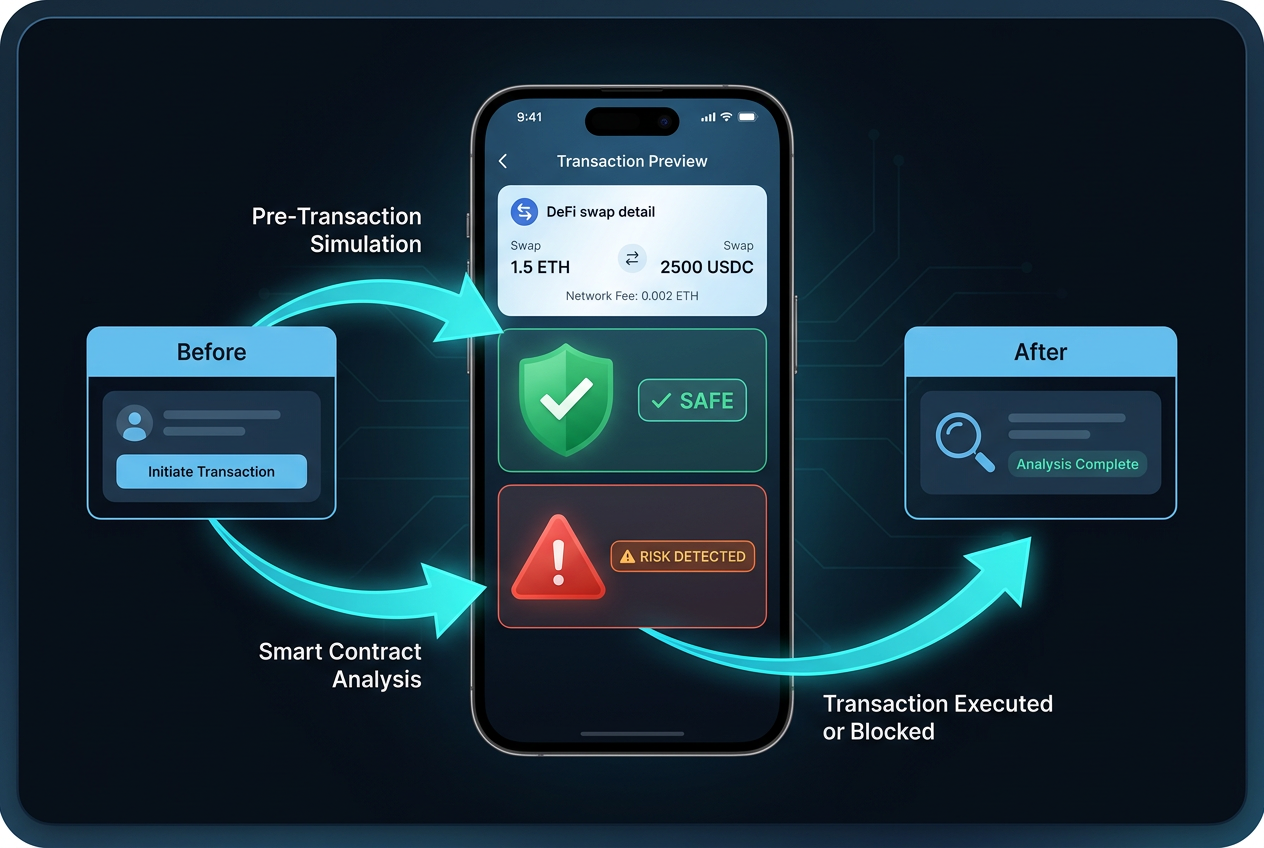
+ +Before you confirm any transaction, Rabby runs a simulation and shows you a clear preview of what will actually happen to your wallet. You see exactly which tokens will leave, which will arrive, and the estimated amounts. No more guessing whether that "approve" call is safe.
+ +This matters more than it sounds. A huge percentage of crypto losses come from users approving malicious contracts or signing transactions they didn't fully understand. Rabby's simulation engine catches these before they happen. It also flags infinite approval requests — those sneaky permissions that grant a contract unlimited access to your tokens indefinitely — and prompts you to set a specific limit instead.
+ +Risk Scanning and Phishing Detection
+ +Every transaction gets scanned against a database of known malicious contracts and phishing sites. If you're about to interact with a flagged address, Rabby throws up a warning. It's not foolproof — no tool is — but it adds a meaningful layer of protection that MetaMask's basic interface doesn't provide by default.
+ +Rabby also includes a built-in token approval manager. You can review all the contracts you've ever approved and revoke them in batches. If you've been active in DeFi for a while, you probably have dozens of old approvals sitting out there. Cleaning those up is basic security hygiene, and Rabby makes it easy.
+ +Hardware Wallet Integration
+ +For maximum security, Rabby connects directly to hardware wallets without requiring bridge software. Supported devices include Ledger (Nano X, Nano S Plus), Trezor, Keystone, BitBox02, OneKey, CoolWallet, and Tangem. The direct connection reduces the attack surface compared to setups that require intermediary applications.
+ +Protect your crypto assets with a Ledger hardware wallet — the gold standard in cold storage security. Pairing a Ledger with Rabby gives you the best of both worlds: Rabby's security previews on the software side, and hardware-level key protection on the signing side.
+ +Multi-Chain Experience: Automatic Network Switching
+ +Here's a small thing that makes a big difference: when you navigate to a dApp on Arbitrum while your wallet is set to Ethereum, Rabby automatically switches to the correct network. MetaMask makes you do this manually, which means extra clicks and — more importantly — extra opportunities to make mistakes.
+ +Rabby's Gas Account feature takes this further. You deposit stablecoins (USDT or USDC) into a dedicated Gas Account, and Rabby uses those funds to pay gas fees across any of its 140+ supported chains. No more scrambling to acquire native gas tokens for every network you use. One stablecoin balance covers everything.
+ +There's a small caveat: the very first Gas Account top-up on a new chain requires a tiny amount of that chain's native token to initiate. After that, the stablecoin balance handles everything. It's a minor friction point, but worth knowing upfront.
+ +Rabby vs MetaMask: Head-to-Head Comparison
+ +Let's be direct about where each wallet wins and loses.
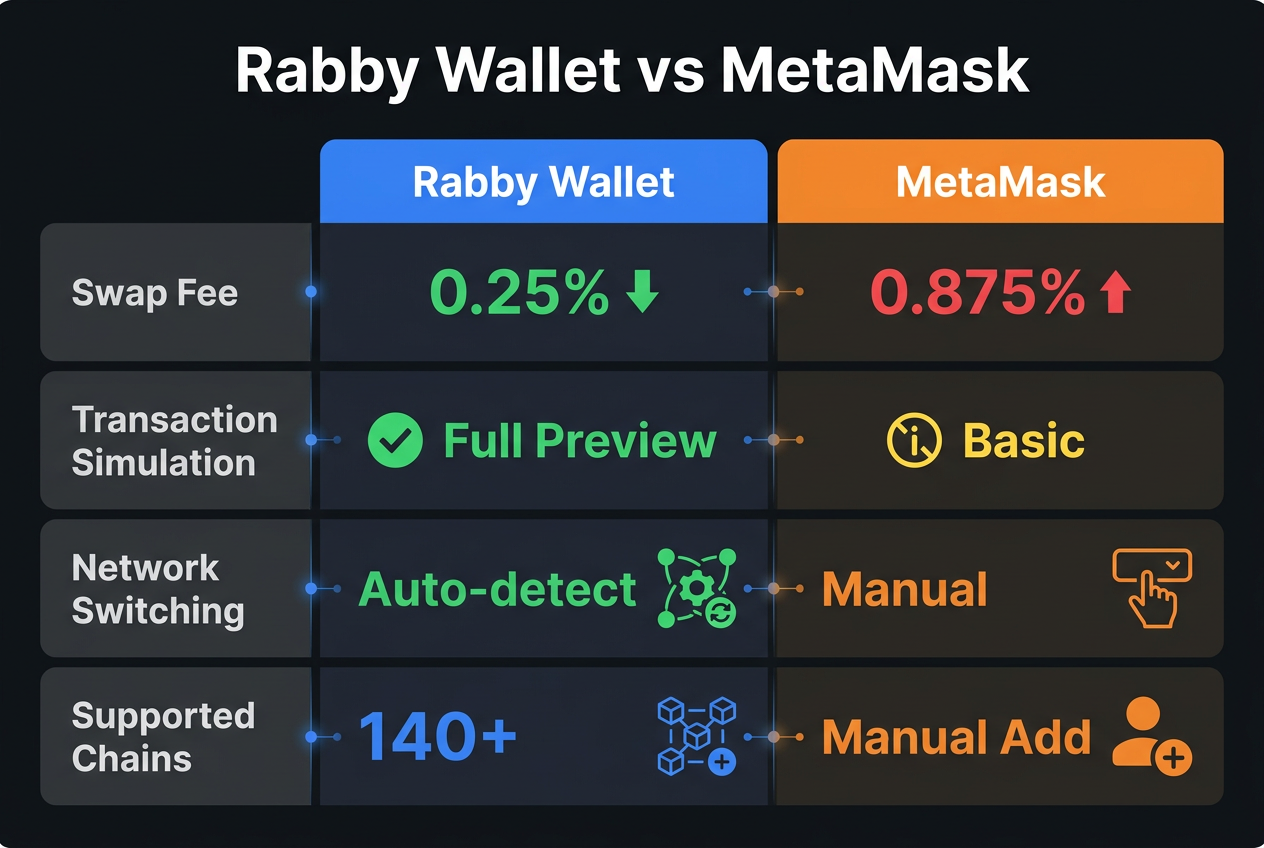
+ +| Feature | +Rabby Wallet | +MetaMask | +
|---|---|---|
| Swap Fee | +0.25% | +0.875% | +
| Transaction Simulation | +✅ Detailed balance-change preview + risk scan | +⚠️ Basic (Blockaid integration) | +
| Network Switching | +✅ Automatic | +❌ Manual | +
| Supported Chains | +140+ | +Hundreds (manual add) | +
| Gas Abstraction | +✅ Gas Account (stablecoins) | +⚠️ Gasless swaps (select networks) | +
| Hardware Wallet Support | +✅ Direct (7 devices) | +✅ Direct (multiple devices) | +
| Token Approval Manager | +✅ Built-in batch revoke | +❌ Requires third-party tool | +
| Mobile App | +✅ iOS & Android | +✅ iOS & Android | +
The swap fee difference alone is significant. If you're swapping $10,000 worth of tokens, MetaMask costs you $87.50 in fees versus $25 with Rabby. Do that a few times a month and the savings add up fast.
+ + +
+
+
+
Fees and Swap Costs: What You Actually Pay
+ +Rabby charges a flat 0.25% fee on in-wallet swaps. That's it for platform fees — no charges for holding assets, connecting to dApps, or managing accounts. The swap feature works as a DEX aggregator, routing your trade through the best available liquidity sources (Uniswap, 1inch, Curve, etc.), which can offset the fee through better pricing.
+ +Compare that to MetaMask's 0.875% swap fee, and Rabby is 3.5x cheaper for the same transaction. For active DeFi users who swap regularly, this is a meaningful cost difference over time.
+ +Network gas fees are separate and determined by the blockchain itself — neither wallet controls those. The Gas Account feature helps manage gas costs across chains, but it doesn't eliminate them.
+ +Setting Up Rabby Wallet: Step-by-Step
+ +Getting started takes about five minutes:
+ +- +
- Download the extension from the Chrome Web Store (search "Rabby Wallet" — the official extension has 4.88/5 stars from verified users). Alternatively, download the desktop app from rabby.io. +
- Create a new wallet or import an existing one using your seed phrase. Rabby supports standard BIP-39 mnemonics, so any MetaMask wallet imports cleanly. +
- Connect a hardware wallet (optional but recommended): plug in your Ledger or Trezor, select "Add Hardware Wallet" in settings, and follow the prompts. No bridge software needed. +
- Fund your Gas Account: deposit USDT or USDC to cover gas fees across chains. Start with $20–50 if you're active across multiple networks. +
- Explore the approval manager: if you're migrating from MetaMask, check your existing token approvals and revoke any you no longer need. +
Want to accelerate your trading journey? Explore Icoinpro's daily trading signals and education platform — pairing a secure wallet setup with solid trading education is how serious crypto investors operate.
+ +Pros and Cons of Rabby Wallet
+ +What Rabby Gets Right
+- +
- Pre-transaction simulation is genuinely useful and reduces the risk of costly mistakes +
- Automatic network switching eliminates a constant friction point for multi-chain users +
- Lower swap fees (0.25% vs MetaMask's 0.875%) save real money over time +
- Gas Account simplifies cross-chain gas management significantly +
- Built-in approval manager for batch-revoking old token permissions +
- Open-source codebase available for public audit +
- Active development — Chrome extension updated as recently as May 2026 +
Where Rabby Falls Short
+- +
- EVM-only — no native support for Solana, Bitcoin, or Cosmos (non-EVM integrations were roadmapped but not yet live as of this review) +
- Mobile app ratings are mixed — 3.4/5 on iOS App Store, with some reports of minor bugs +
- Smaller ecosystem than MetaMask — some dApps default to MetaMask prompts, requiring manual connection +
- Gas Account first top-up requires a small amount of native token on each new chain +
- Discontinued Pulsechain support raised transparency concerns among some users +
Is Rabby Wallet Right for You?
+ +If you're an active DeFi user who regularly interacts with multiple EVM chains, Rabby Wallet is a clear upgrade over MetaMask. The pre-transaction simulation alone is worth the switch — it's the kind of safety net that could prevent a five-figure mistake. The lower swap fees and automatic network switching are practical quality-of-life improvements that compound over time.
+ +If you're primarily a Bitcoin holder, a Solana-focused user, or someone who only occasionally buys and holds crypto on a single chain, Rabby's advantages are less relevant. Stick with whatever you're comfortable with.
+ +For the DeFi power user who's tired of blind-signing transactions and manually switching networks: Rabby is worth your time. The Rabby Wallet review verdict — it's the most security-conscious EVM wallet available in 2026, and the fee savings make it a no-brainer for frequent traders.
+ +Looking for reliable crypto storage alongside your Rabby setup? Trezor wallets have been trusted by millions since 2014 and pair seamlessly with Rabby's direct hardware wallet integration.
+ +Key Takeaways
+- +
- Rabby Wallet supports 140+ EVM chains with automatic network switching +
- Pre-transaction simulation shows exact balance changes before you sign +
- Swap fees are 0.25% — 3.5x cheaper than MetaMask's 0.875% +
- Gas Account lets you pay gas on any chain using stablecoins +
- Direct hardware wallet support for Ledger, Trezor, and 5 other devices +
- Best suited for active DeFi users on EVM chains; not ideal for Solana/Bitcoin users +
Frequently Asked Questions
+ +Is Rabby Wallet safe?
+Yes. Rabby is non-custodial (you control your private keys), open-source, and includes proactive security features like pre-transaction simulation and risk scanning. It's considered one of the safer EVM wallets available. That said, no software wallet is as secure as a hardware wallet — use both together for maximum protection.
+ +Can I import my MetaMask wallet into Rabby?
+Yes. Rabby supports standard BIP-39 seed phrases, so you can import any MetaMask wallet directly. Your accounts, balances, and transaction history will be accessible immediately.
+ +Does Rabby Wallet have a token or airdrop?
+As of May 2026, Rabby does not have an official token. The DeBank team has an existing points system, and there has been community speculation about a potential future airdrop, but nothing has been officially confirmed. Use the wallet for its features, not airdrop speculation.
+ +Is Rabby Wallet available on mobile?
+Yes. Rabby has iOS and Android apps available on the Apple App Store and Google Play Store. The mobile experience is functional but has received mixed reviews (3.4/5 on iOS), with some users reporting minor bugs. The browser extension and desktop app are generally considered more polished.
+ +What chains does Rabby support?
+Rabby supports over 140 EVM-compatible chains, including Ethereum, Arbitrum, Optimism, Polygon, BNB Chain, Avalanche, Base, and many more. Non-EVM chains like Solana and Bitcoin are not currently supported natively.
+July 2026 Update: Rabby Wallet — What's New and What Still Stands
Rabby Wallet has continued to solidify its position as the go-to browser wallet for serious DeFi users in 2026. Since our original review in May, a few notable developments are worth highlighting — plus some clarifications based on reader questions we've received.
Mobile App Now Fully Mature
Rabby's mobile apps (iOS and Android) have matured significantly. The mobile version now includes the full transaction simulation suite — the same pre-signing risk preview that made the desktop extension famous. This is a meaningful upgrade; previously, mobile users had a stripped-down experience. Now you get the same security layer whether you're on desktop or phone.
GasAccount: Stablecoin Gas Payments Expanded
The GasAccount feature — which lets you deposit USDC or USDT to cover gas fees across multiple networks — has expanded to support more chains. This is genuinely useful for DeFi power users who operate across 5-10 chains simultaneously and don't want to maintain native gas tokens on each one. It's a small quality-of-life improvement that adds up over time.
Hardware Wallet Integration: Now Includes BitBox02
Rabby added BitBox02 to its hardware wallet integration list, joining Ledger, Trezor, and Keystone. If you're using Rabby for DeFi while keeping your private keys on a hardware device, the BitBox02 is now a supported option. Speaking of hardware wallets — if you haven't secured your crypto in cold storage yet, the Ledger Nano X remains the most widely compatible option for Rabby users.
What Hasn't Changed (And Shouldn't)
Rabby's core value proposition remains intact: it's still EVM-only, still open-source, still audited by Least Authority, SlowMist, PeckShield, and Quantstamp. The approval management tool — one-click batch revokes across multiple chains — is still the best in class. If you're active in DeFi and you're not using Rabby, you're leaving security on the table.
For users who also need Solana access, check out our comparison of Phantom vs MetaMask. And if you're thinking about hardware wallet security alongside Rabby, our step-by-step hardware wallet setup guide walks through the full process.
Frequently Asked Questions: Rabby Wallet 2026
Q: Is Rabby Wallet safe to use in 2026?
Yes. Rabby has undergone multiple independent security audits by Least Authority, SlowMist, PeckShield, and Quantstamp. Its open-source codebase is publicly verifiable on GitHub. The pre-transaction simulation feature actively protects users from malicious contracts before they sign anything. It's one of the most security-focused browser wallets available.
Q: Does Rabby Wallet support Bitcoin or Solana?
No. Rabby is strictly an EVM-compatible wallet. It does not support Bitcoin, Solana, XRP, Sui, or other non-EVM chains. For Solana, use Phantom. For Bitcoin, use a dedicated Bitcoin wallet or a hardware wallet like Ledger that supports multiple chains.
Q: How does Rabby's transaction simulation work?
Before you sign any transaction, Rabby simulates the outcome on-chain and shows you a plain-language preview: exactly what tokens will leave your wallet, what you'll receive, estimated gas fees, and any risk flags. You see the outcome before committing. This catches phishing attempts and malicious contracts that would otherwise drain your wallet.
Q: Can I use Rabby Wallet with a hardware wallet?
Yes. Rabby integrates with Ledger, Trezor, Keystone, and BitBox02. This is the recommended setup for serious DeFi users: Rabby as your browser interface for DeFi interactions, with a hardware wallet holding your private keys offline. You get the best of both worlds — DeFi accessibility and cold storage security.
Q: What is Rabby's GasAccount feature?
GasAccount lets you deposit stablecoins (USDC/USDT) to cover transaction fees across multiple supported networks. Instead of maintaining native gas tokens (ETH, MATIC, BNB, etc.) on every chain you use, you can fund a single GasAccount and let Rabby handle the conversion. It's particularly useful for users active across many EVM chains simultaneously.
Tools are only as good as the trader using them.
The best platform in the world won't help if your analysis is off. Before investing in more tools, consider investing in your trading education — it's the one thing that compounds everything else.
The program I recommend to people who ask me is this crypto trading course — it\'s the one I point friends and family to when they\'re serious about learning. Daily lessons, live analysis, and a community that actually helps.
Affiliate link — I may earn a commission at no extra cost to you. I only recommend what I genuinely use.
Disclaimer: The information provided on this website is for educational and informational purposes only. It should not be considered financial or investment advice. Cryptocurrency investments carry significant risk. Always do your own research and consult with a qualified financial advisor before making investment decisions.
Free Crypto Insights
Get weekly trading tips, market analysis, and exclusive strategies delivered to your inbox.