How to Use the Bitcoin Lightning Network in 2026: A Complete Beginner's Guide
Affiliate Disclosure: This article may contain affiliate links. We may earn a commission at no extra cost to you. All opinions are our own.
Marcus Chen
Senior Crypto Analyst & Educator
Certified Blockchain Professional | Former Wall Street Analyst
Marcus Chen is a cryptocurrency analyst and educator with over 8 years of experience in digital asset trading. He has helped thousands of beginners navigate the crypto markets through practical, actionable education.

How to Use the Bitcoin Lightning Network in 2026: A Complete Beginner's Guide
The Bitcoin Lightning Network has quietly become one of the most important infrastructure upgrades in crypto — and in 2026, it's more usable than ever. Whether you want to send $5 to a friend in seconds, pay for coffee with Bitcoin, or receive international remittances without bank fees, Lightning makes it possible. This guide walks you through exactly how it works, which wallets to use, and how to get started today.
What Is the Bitcoin Lightning Network?
Bitcoin's base layer is secure and decentralized, but it's slow. Transactions take 10 minutes on average and fees spike during congestion. The Lightning Network solves this by moving most transactions off-chain — into direct payment channels between users — while still settling on Bitcoin's blockchain when needed.
Think of it like a bar tab. Instead of paying for every drink individually (slow, expensive), you run a tab and settle at the end of the night. Lightning works the same way: you open a channel, transact freely, and close it when you're done. The Bitcoin blockchain only records the opening and closing — not every payment in between.
The result? Transactions that confirm in under a second, with fees often below $0.01. In 2026, the network processes roughly $1.17 billion in monthly volume, and major exchanges like Coinbase, Binance, OKX, and Kraken all support Lightning withdrawals.
How Lightning Network Payment Channels Work
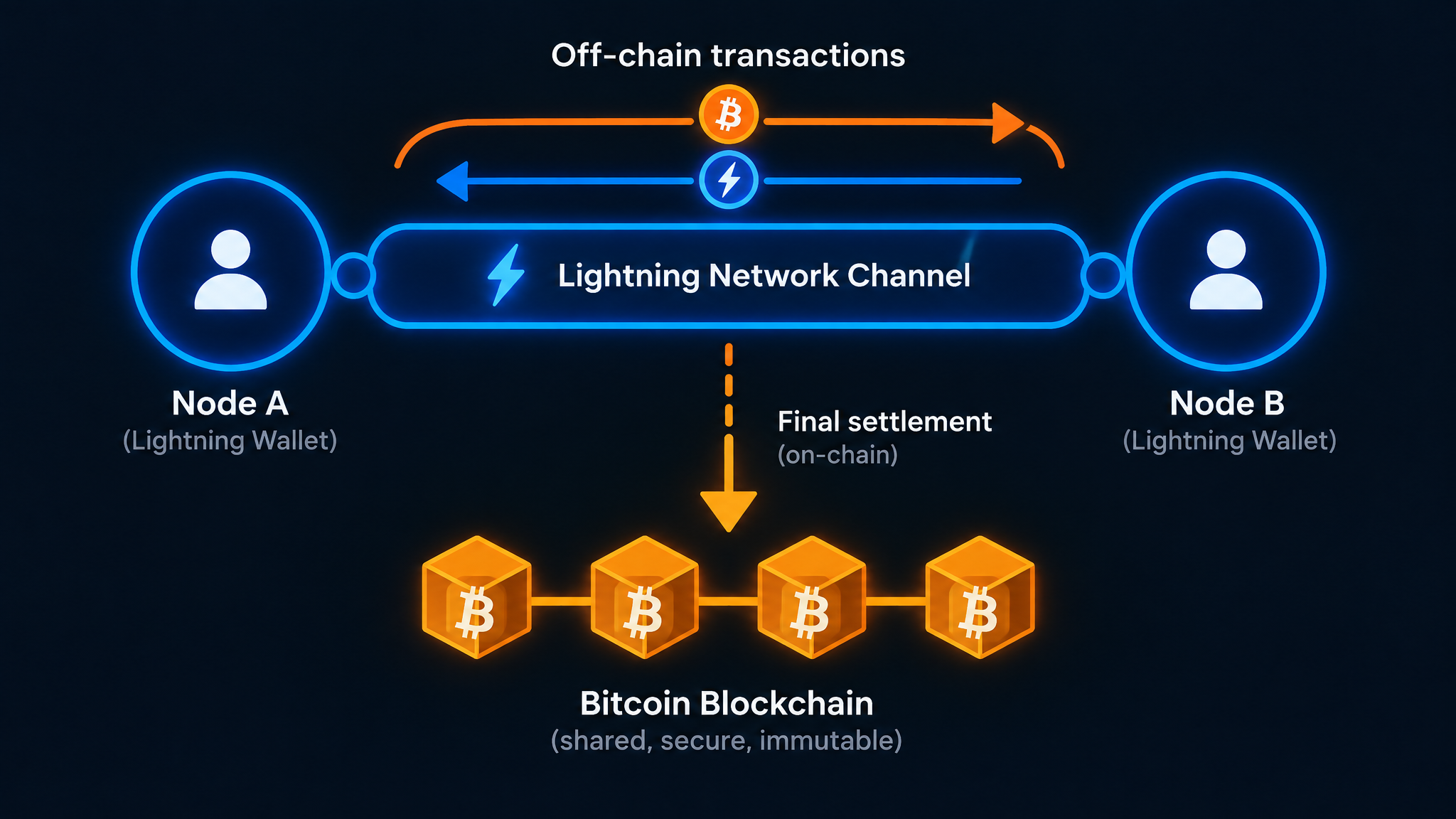
Here's the mechanics in plain English:
- Open a channel: Two parties lock Bitcoin into a 2-of-2 multi-signature address on the Bitcoin blockchain. This is the only on-chain transaction required to start.
- Transact freely: Both parties exchange signed "commitment transactions" — essentially IOUs — that update their balances. None of these hit the blockchain.
- Route through the network: You don't need a direct channel with everyone you pay. Lightning automatically routes payments through intermediate nodes using onion routing, which also preserves privacy.
- Close the channel: When you're done, the final balance is broadcast to the Bitcoin blockchain. One on-chain transaction settles everything.
The cryptographic magic that makes this safe is called Hash Time-Locked Contracts (HTLCs). These ensure payments are atomic — they either succeed completely or fail without any funds being lost. No intermediary can steal your Bitcoin mid-route.
Choosing the Right Lightning Wallet in 2026
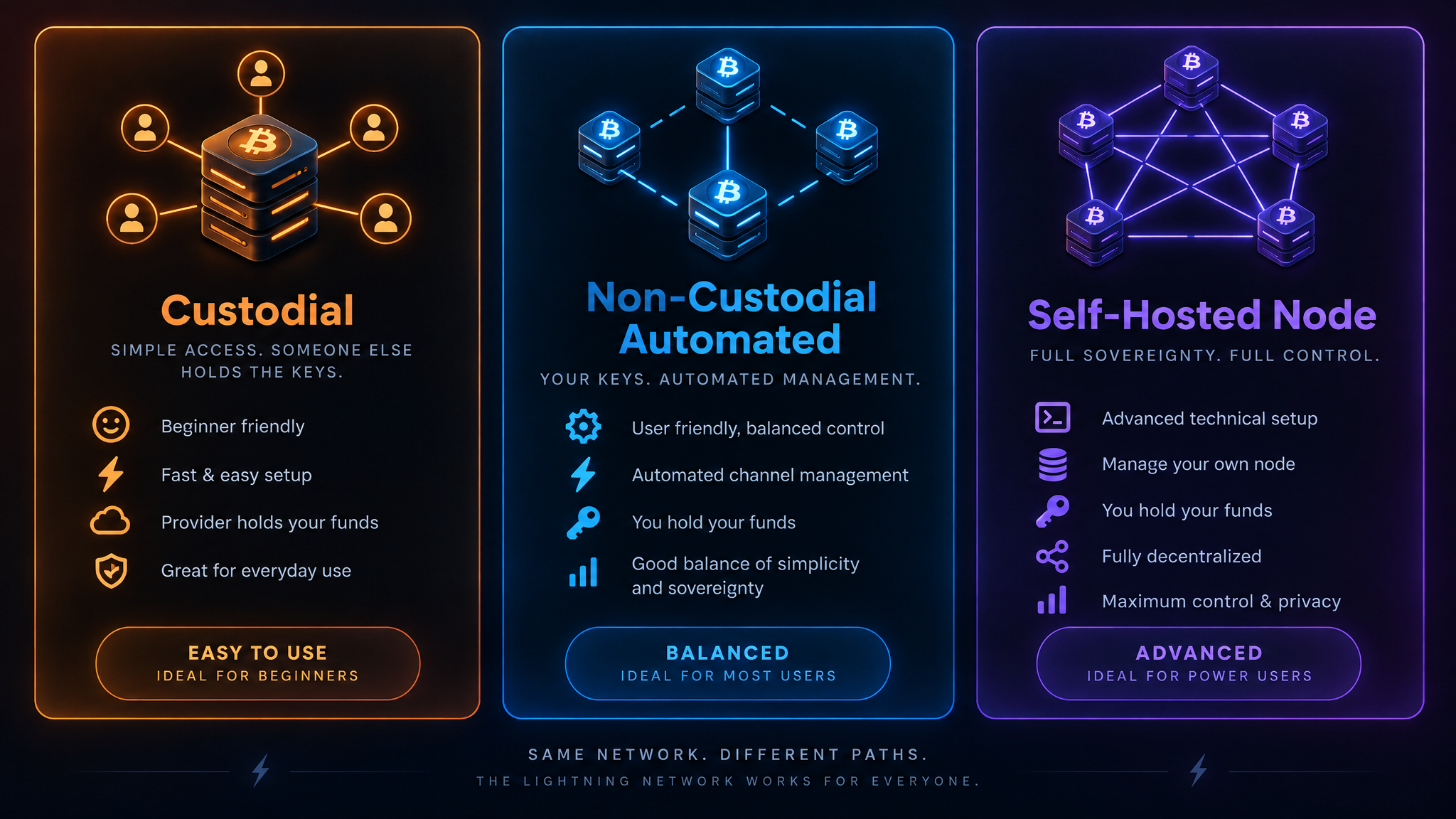
This is where most beginners get confused. There are three types of Lightning wallets, and the right one depends on your technical comfort level.
Option 1: Custodial Wallets (Easiest)
Apps like Wallet of Satoshi and Strike hold your keys for you. You don't manage channels, liquidity, or any technical settings. Just download, fund, and send.
The tradeoff: you're trusting a third party with your Bitcoin. Strike also requires KYC (identity verification). These are great for small spending amounts — treat them like a digital checking account, not a savings vault.
Best for: Absolute beginners, small daily payments, fiat-to-Bitcoin conversions.
Option 2: Non-Custodial Automated Wallets (Recommended)
Phoenix Wallet (by ACINQ) is the gold standard here. It's self-custodial — you control your keys — but it automates all the complex channel management using a technology called splicing. You see a single unified balance, not a confusing list of channels.
Phoenix charges a 0.4% routing fee (minimum 4 sats) and a 1% liquidity fee when new inbound capacity is needed. Small price for the convenience. Breez is another solid option, especially if you're a merchant — it has a built-in point-of-sale system.
Best for: Most users who want self-custody without the technical headache.
Option 3: Self-Hosted Nodes (Advanced)
Running your own Lightning node (using software like LND, Core Lightning, or Eclair) gives you maximum control and privacy. You manage your own channels, set your own routing fees, and can even earn sats by routing other people's payments.
The downside: it requires a dedicated server or Raspberry Pi, constant uptime, and active management of channel liquidity. Not for beginners.
Best for: Technical users, merchants with high volume, privacy maximalists.
Ready to accelerate your crypto trading journey beyond just payments? Explore Icoinpro's daily trading signals and education platform — built for people who want to go deeper than the basics.
Step-by-Step: How to Get Started with Lightning
Let's walk through the simplest path — using Phoenix Wallet.
Step 1: Download Phoenix Wallet
Available on iOS and Android. It's open-source and has been audited. During setup, you'll receive a 12-word seed phrase — write it down on paper and store it somewhere safe. This is your backup.
Step 2: Fund Your Wallet
You can receive Bitcoin directly to your Phoenix wallet address. If you're buying from an exchange, use one that supports Lightning withdrawals (Coinbase, Binance, OKX, Kraken all do). Alternatively, send on-chain Bitcoin — Phoenix will automatically open a Lightning channel for you.
Start small. Put $20–$50 in to get comfortable before moving larger amounts.
Step 3: Send Your First Payment
Lightning payments use invoices — a string of text or QR code that encodes the payment details. When someone sends you an invoice, paste it into Phoenix and hit send. Done in under a second.
You can also use Lightning addresses (format: [email protected]) for recurring payments — much easier than generating a new invoice every time.
Step 4: Receive Payments
To receive, tap "Receive" in Phoenix and share your invoice or Lightning address. The first time you receive a payment, Phoenix may charge a small liquidity fee to open inbound channel capacity. After that, receiving is free.
Step 5: Manage Your Balance
Keep your Lightning wallet funded only with what you plan to spend. For long-term Bitcoin storage, use cold storage — a hardware wallet keeps your private keys offline and safe.
Protect your long-term Bitcoin holdings with a Ledger hardware wallet — the gold standard in cold storage security. Your Lightning wallet is for spending; your hardware wallet is for saving.
What Can You Actually Do with Lightning in 2026?
The use cases have expanded significantly. Here's what's live and working:
- Merchant payments: Block (formerly Square) is rolling out Lightning to ~4 million US point-of-sale merchants. Coffee shops, online stores, and freelancers increasingly accept it.
- International remittances: Services like Bitnob let users in Africa send and receive dollars via Lightning with near-zero fees — a genuine alternative to Western Union.
- Exchange withdrawals: Over 15% of Bitcoin withdrawals from Coinbase now go via Lightning. It's faster and cheaper than on-chain.
- Stablecoin payments: Tether's USDT is now available on Lightning via Taproot Assets, enabling dollar-denominated Lightning payments.
- Streaming payments: Podcasting apps like Fountain let listeners stream tiny amounts of sats to creators per minute listened — a new creator monetization model.
Key Risks and Limitations to Know
Lightning is powerful, but it's not perfect. Here's what to watch out for:
Hot Wallet Risk
Lightning wallets are always online (hot wallets). Never store your entire Bitcoin stack on Lightning. Use it like a checking account — keep spending money there, savings in cold storage.
Inbound Liquidity
To receive payments, you need "inbound liquidity" — someone else needs to have capacity pointed at you. Phoenix handles this automatically, but it costs a small fee. Self-hosted node operators have to manage this manually.
Channel Force-Closes
If your counterparty goes offline for an extended period, you may need to force-close a channel, which requires an on-chain transaction and a waiting period. Modern wallets minimize this risk, but it's worth knowing.
Network Centralization
A small number of professional routing hubs carry most of the network's liquidity (Gini coefficient near 0.97). This isn't a security risk for users, but it's a centralization concern worth monitoring as the network evolves.
Lightning vs. On-Chain Bitcoin: When to Use Which
| Use Case | Lightning | On-Chain |
|---|---|---|
| Small payments (<$100) | ✅ Ideal | ❌ Fees too high |
| Large transfers (>$1,000) | ⚠️ Possible but check liquidity | ✅ More reliable |
| Long-term storage | ❌ Hot wallet risk | ✅ Use cold storage |
| Speed | ✅ <1 second | ❌ ~10 minutes |
| Merchant payments | ✅ Perfect | ❌ Too slow |
The Future of Lightning: What's Coming
The protocol is still evolving. A few upgrades worth knowing about:
- BOLT12 Offers: Reusable, static payment identifiers — like a permanent Lightning address baked into the protocol. Eliminates the need to generate new invoices every time.
- Splicing: Resize channels without closing them, reducing on-chain fee friction. Phoenix already uses this.
- Taproot Channels: Enhanced privacy and smaller on-chain footprint for channel operations.
- Ark and Spark: New "channelless" alternatives that aim to solve the inbound liquidity problem entirely. Still early, but worth watching.
For a structured approach to learning crypto trading and understanding how Bitcoin fits into a broader investment strategy, Icoinpro offers step-by-step training that has helped thousands of beginners build real skills.
Actionable Takeaways
- Download Phoenix Wallet for the best balance of self-custody and ease of use
- Start with a small amount ($20–$50) to get comfortable before moving larger sums
- Use Lightning for spending; keep long-term savings in cold storage
- Lightning addresses ([email protected]) are easier than invoices for recurring payments
- Major exchanges (Coinbase, Binance, OKX, Kraken) all support Lightning withdrawals — use them to fund your wallet cheaply
- Never store your entire Bitcoin stack in a Lightning wallet — it's a hot wallet
Want structured training instead of piecing it together yourself?
Self-education works, but it's slow. The course that accelerated my learning the most gave me a daily framework — real market analysis, real setups, real accountability.
The program I recommend to people who ask me is this crypto trading course — it\'s the one I point friends and family to when they\'re serious about learning. Daily lessons, live analysis, and a community that actually helps.
Affiliate link — I may earn a commission at no extra cost to you. I only recommend what I genuinely use.
Disclaimer: The information provided on this website is for educational and informational purposes only. It should not be considered financial or investment advice. Cryptocurrency investments carry significant risk. Always do your own research and consult with a qualified financial advisor before making investment decisions.
Free Crypto Insights
Get weekly trading tips, market analysis, and exclusive strategies delivered to your inbox.